Solved paper · Internals-1 · 26 September 2025
Internals-1 2025, worked in full
Every question from the 23CS7PCNWP Internals-1 paper, answered completely. Each one carries the mark split — where the examiner's five or ten marks actually sit — because a correct answer that misses the diagram loses just as much as a wrong one.
| Part | Marks | Choice | Questions |
|---|---|---|---|
| A | 5 | None | Q1 — value-result arguments |
| B | 15 | None | Q2a conversion functions · Q2b netstat · Q2c socket options |
| C | 20 | Internal | Q3a or Q3b · Q4a or Q4b |
- 2
- The definition — that the length is a value going in and a result coming out, and why each.
- 2
- Both directions named, with the 3 + 4 functions.
- 1
- A code example showing
sizeof(serv)against&len.
Answer
When a socket address structure is passed to any socket function it is always passed by reference — a pointer to the structure — and the length of the structure is passed as well. How the length is passed depends on the direction the structure is travelling.
Direction 1 — from the process to the kernel.
Three functions do this: bind, connect and
sendto. One argument is the pointer to the socket address
structure, and another is the integer size of the structure:
struct sockaddr_in  serv;

/* fill in serv{} */

connect(sockfd, (SA *) &serv, sizeof(serv));
Since the kernel is passed both the pointer and the size of what the pointer points to, it knows exactly how much data to copy from the process into the kernel. Here the size is a plain value argument — it goes in and nothing comes back.
Direction 2 — from the kernel to the process.
Four functions do this: accept, recvfrom,
getsockname and getpeername. Here two of the
arguments are the pointer to the socket address structure and a pointer to an
integer containing the size:
struct sockaddr_un  cli;      /* Unix domain */
socklen_t  len;

len = sizeof(cli);             /* len is a value */

getpeername(unixfd, (SA *) &cli, &len);

/* len may have changed */Worked example. A server accepting a connection:
struct sockaddr_storage  cli;
socklen_t  len;

len = sizeof(cli);             /* len = 128 going IN  */

connfd = accept(listenfd, (SA *) &cli, &len);

/* the peer was IPv4, so the kernel stored a 16-byte
   sockaddr_in and set len = 16 coming OUT.
   Had the peer been IPv6, len would now read 28. */
Going in, len = 128 is the limit: it stops the
kernel overrunning the buffer. Coming out, len = 16 is the
fact: it tells the process both how many bytes were written and,
implicitly, what kind of peer connected.
sockaddr_in, 28 for
sockaddr_in6. For a variable-length one such as
sockaddr_un it can be less than the maximum.
The length of a returned socket address structure is the most common value-result argument, but not the only one: the middle three arguments to
select
and the length argument to getsockopt behave the same way.
The figure printed on the paper is UNP Figure 3.11, "Summary of address conversion functions" (book p.84), with the five function labels replaced by Function 1 to Function 5. It shows three numeric forms along the top and three presentation forms along the bottom.
- 3
- Naming all five functions correctly.
- 1
- Mapping each to its direction — presentation → numeric, or the reverse.
- 1
- Saying which handle IPv6, and noting
inet_addris deprecated.
Answer — the five functions
| # | Function | Direction | Families |
|---|---|---|---|
| 1 | inet_aton | presentation → numeric | IPv4 only |
| 2 | inet_addr | presentation → numeric | IPv4 only · deprecated |
| 3 | inet_ntoa | numeric → presentation | IPv4 only |
| 4 | inet_pton | presentation → numeric | IPv4 and IPv6 |
| 5 | inet_ntop | numeric → presentation | IPv4 and IPv6 |
Reading the figure column by column.
| Numeric form (top) | Presentation form (bottom) | The arrows between them |
|---|---|---|
in_addr{}32-bit binary IPv4 address |
dotted-decimal IPv4 address206.168.112.96 |
Up: inet_aton, inet_addr, and inet_pton(AF_INET).Down: inet_ntoa and inet_ntop(AF_INET).
|
in6_addr{}128-bit binary IPv4-mapped or IPv4-compatible IPv6 address |
x:x:x:x:x:x:a.b.c.d |
Up: inet_pton(AF_INET6). Down: inet_ntop(AF_INET6). |
in6_addr{}128-bit binary IPv6 address |
x:x:x:x:x:x:x:x |
Up: inet_pton(AF_INET6). Down: inet_ntop(AF_INET6). |
Reconstructed figure
This is the same figure, live. Press quiz me to blank the labels exactly as the exam paper did, and click any arrow for the prototype.
The prototypes, if asked
#include <arpa/inet.h>

int   inet_aton(const char *strptr, struct in_addr *addrptr);
in_addr_t inet_addr(const char *strptr);
char *inet_ntoa(struct in_addr inaddr);

int   inet_pton(int family, const char *strptr, void *addrptr);
const char *inet_ntop(int family, const void *addrptr,
char *strptr, size_t len);1.
p is presentation and n is
numeric — which is why only inet_pton and
inet_ntop reach the IPv6 columns at all; the three older
inet_a… functions predate IPv6 and can only touch the leftmost
column.
2.
inet_addr is deprecated because
it returns INADDR_NONE (typically 32 one-bits) on error — which is
also the valid broadcast address 255.255.255.255, so it cannot tell
that address apart from a failure.
- 1
- Naming the command, with the
-aflag. - 3
- All six column headers explained.
- 1
- Reading the three rows — why the listening socket is still there and why the connection appears twice.
Part 1 — the command
netstat -anetstat -a | grep 9877
netstat shows the status of the sockets on the system.
The -a flag is essential: without it, listening
sockets are not shown, and the third row — the LISTEN line — would
be missing. That flag is worth stating explicitly.
The line Active Internet connections (servers and established) is
netstat's own heading, and the word servers in it is
confirmation that -a was used.
Part 2 — the column headers
| Header | Meaning |
|---|---|
Proto |
The protocol this socket uses — tcp, tcp6, udp or raw. Determined by the type and protocol arguments given to socket(). |
Recv-Q |
Receive queue. The number of bytes that have arrived and are sitting in the kernel's receive buffer waiting for the application to read(). Normally 0; persistently non-zero means the application is not keeping up. |
Send-Q |
Send queue. The number of bytes the application has written that the kernel still holds — sent but not yet acknowledged by the peer, or not yet sent. Normally 0; persistently non-zero points at the network or at a peer that has stopped reading. |
Local Address |
The local half of the socket pair — local IP address and local port, as address:port. netstat prints an asterisk for an IP address of 0 (INADDR_ANY, the wildcard) or for a port of 0. |
Foreign Address |
The foreign half of the socket pair — the peer's IP address and port. A listening socket has no peer, so it prints *:*. |
State |
The TCP state of the socket — one of the eleven states of the TCP state transition diagram. Blank for UDP, which has no states. |
Part 3 — reading the three rows
| Row | What it is |
|---|---|
*:9877 → *:* LISTEN |
The server's listening socket, still open. Local address is the wildcard, so it accepts connections on any local interface; the port is the server's well-known port 9877. There is no peer, hence *:*. Accepting a client does not consume this socket. |
localhost:9877 → localhost:42758 |
The server's connected socket, returned by accept. Local port is the well-known 9877, foreign port is the client's. |
localhost:42758 → localhost:9877 |
The client's socket, the mirror image of the row above. 42758 is an ephemeral port the kernel chose automatically — the client never called bind. |
1. The client and server are running on the same host, so
netstat shows both ends of one connection.
Rows two and three are the same connection seen from opposite sides — the
four-tuple of one is the four-tuple of the other with the halves swapped. Run
them on different machines and each host would show only one row.
2. The listening socket is still in LISTEN. A concurrent server keeps
listenfd open for its whole life; only
connfd belongs to a particular client.
i.
IP_TTL ii. SO_BROADCAST
iii. TCP_MAXSEG iv. IPV6_DONTFRAG
v. SO_LINGER
- 1
- Stating the two categories: flag options and value options.
- 2
- Correct level and category for all five.
- 2
- A syntax line for each, with the right datatype — especially
struct linger.
First, the two categories
For a flag option,
*optval is an int:
getsockopt returns zero if disabled and non-zero if enabled, and
setsockopt needs a non-zero value to turn it on and zero to turn it
off. For a value option, optval points at a value of
the datatype given in the table.
Summary table
| Option | Level | Category | Datatype | get / set |
|---|---|---|---|---|
IP_TTL | IPPROTO_IP | Value | int | both |
SO_BROADCAST | SOL_SOCKET | Flag | int | both |
TCP_MAXSEG | IPPROTO_TCP | Value | int | both |
IPV6_DONTFRAG | IPPROTO_IPV6 | Flag | int | both |
SO_LINGER | SOL_SOCKET | Value | struct linger{} | both |
The syntax, one at a time
i. IP_TTL — level IPPROTO_IP, value option, int. Sets the default time-to-live (hop limit) in the IP header of outgoing unicast packets. Default 64 for TCP and UDP, 255 for raw sockets.
int  ttl = 64;
socklen_t  len = sizeof(ttl);

setsockopt(sockfd, IPPROTO_IP, IP_TTL, &ttl, sizeof(ttl));
getsockopt(sockfd, IPPROTO_IP, IP_TTL, &ttl, &len);
ii. SO_BROADCAST — level SOL_SOCKET, flag option, int. Permits the sending of broadcast datagrams. Applies only to datagram sockets; broadcasting is not supported on a stream socket.
int  on = 1;
socklen_t  len = sizeof(on);

setsockopt(sockfd, SOL_SOCKET, SO_BROADCAST, &on, sizeof(on));
getsockopt(sockfd, SOL_SOCKET, SO_BROADCAST, &on, &len);
iii. TCP_MAXSEG — level IPPROTO_TCP, value option, int. Fetches or sets the maximum segment size — the maximum amount of TCP data sent per segment. The value is the one announced in the MSS option on the SYNs, so fetching it on an established connection returns what the peer announced.
int  mss;
socklen_t  len = sizeof(mss);

getsockopt(sockfd, IPPROTO_TCP, TCP_MAXSEG, &mss, &len);
setsockopt(sockfd, IPPROTO_TCP, TCP_MAXSEG, &mss, sizeof(mss));
iv. IPV6_DONTFRAG — level IPPROTO_IPV6, flag option, int. Disables automatic fragmentation for datagram or raw sockets: an oversized packet is dropped rather than fragmented, and no error is returned to the process.
int  on = 1;
socklen_t  len = sizeof(on);

setsockopt(sockfd, IPPROTO_IPV6, IPV6_DONTFRAG, &on, sizeof(on));
getsockopt(sockfd, IPPROTO_IPV6, IPV6_DONTFRAG, &on, &len);
v. SO_LINGER — level SOL_SOCKET, value option, and the only one of the five that takes a structure. It specifies how close operates for a connection-oriented protocol.
struct linger {
    int  l_onoff;    /* 0 = off, nonzero = on */
    int  l_linger;   /* linger time, in seconds */
};

struct linger  ling;
socklen_t  len = sizeof(ling);

ling.l_onoff  = 1;
ling.l_linger = 30;

setsockopt(sockfd, SOL_SOCKET, SO_LINGER, &ling, sizeof(ling));
getsockopt(sockfd, SOL_SOCKET, SO_LINGER, &ling, &len);
Its three behaviours:
l_onoff= 0 — the default.closereturns immediately; remaining data is delivered in the background.l_onoffnon-zero,l_linger= 0 — abortive close. TCP discards remaining data and sends an RST, skipping the four-packet termination and TIME_WAIT.l_onoffnon-zero,l_lingernon-zero — the process sleeps until all data is sent and acknowledged, or the linger time expires (in which caseclosereturnsEWOULDBLOCKand remaining data is discarded).
int; SO_LINGER takes a struct linger
— if every example in your answer passes &on you have missed the
one distinction the question was built around. And IP_TTL looks like
a flag but is a value: you pass a hop count, not on/off.
Also worth one line:
setsockopt takes
socklen_t optlen while getsockopt takes
socklen_t *optlen — because for getsockopt it is a
value-result argument, tying this question back to Q1.
- 2
- What an association is, and why SCTP says "association" rather than "connection".
- 3
- The four-way handshake diagram, correctly labelled.
- 2
- The five numbered establishment steps, with the cookie explained.
- 2
- The three-way shutdown diagram and steps.
- 1
- The differences from TCP — no half-close, no TIME_WAIT.
1 · What an association is
SCTP provides associations between clients and servers. Like TCP it provides reliability, sequencing, flow control and full-duplex data transfer, and like TCP it is connection-oriented, so it has establishment and termination handshakes.
The word association is used instead of connection deliberately. A connection is between two IP addresses. An association is between two endpoints, each of which may have several IP addresses — SCTP supports multihoming — so "connection" would be too narrow a word. SCTP is also message-oriented, providing sequenced delivery of individual records, and provides multiple streams within one association, so a loss in one stream does not block delivery in the others.
2 · Association establishment — the four-way handshake
-
The server must be prepared to accept an incoming association.
This is normally done by calling
socket,bindandlisten, and is called a passive open. -
The client issues an active open by calling
connect, or by sending a message which implicitly opens the association. This causes the client SCTP to send an INIT message, telling the server:- the client's list of IP addresses,
- its initial sequence number,
- an initiation tag to identify all packets in this association,
- the number of outbound streams the client is requesting,
- the number of inbound streams the client can support.
- The server acknowledges the client's INIT with an INIT-ACK message, containing the server's list of IP addresses, initial sequence number, initiation tag, outbound and inbound stream counts, and a state cookie. The state cookie contains all of the state the server needs to ensure that the association is valid, and is digitally signed to ensure its validity.
- The client echoes the server's state cookie back in a COOKIE-ECHO message. This message may also contain user data bundled within the same packet.
- The server acknowledges that the cookie was correct and that the association was established, with a COOKIE-ACK message. This message may also contain user data.
The minimum number of packets required for this exchange is four; hence this process is called SCTP's four-way handshake.
3 · The tags and the cookie
The INIT carries a verification tag Ta and an initial sequence number J. Ta must be present in every packet sent by the peer for the life of the association. The peer chooses its own verification tag Tz, which must be present in each of its packets. J is the starting sequence number for DATA messages, which SCTP calls DATA chunks. The receiver of the INIT also sends a cookie C, which contains all the state needed to set up the association so that the server's SCTP stack does not need to keep information about the associating client. At the conclusion of the handshake each side chooses a primary destination address, used as the default destination in the absence of network failure.
4 · Association termination — the three-way shutdown
Unlike TCP, SCTP does not support a half-close. When one end shuts down an association, the other end must stop sending new data, and any data queued at either end is still transmitted before the shutdown completes — so no queued data is lost.
- One end calls
close; its SCTP sends a SHUTDOWN chunk. - The peer drains its queues and replies with a SHUTDOWN-ACK chunk.
- The initiator responds with SHUTDOWN-COMPLETE, and the association is gone.
Three packets, and SCTP has no TIME_WAIT state — the verification tags already prevent an old packet being mistaken for part of a new association, which is exactly the job TIME_WAIT does for TCP.
5 · Comparison with TCP — the closing paragraph
| TCP | SCTP | |
|---|---|---|
| Set-up | 3 packets — SYN, SYN+ACK, ACK | 4 — INIT, INIT-ACK, COOKIE-ECHO, COOKIE-ACK |
| Teardown | 4 packets — FIN, ACK, FIN, ACK | 3 — SHUTDOWN, SHUTDOWN-ACK, SHUTDOWN-COMPLETE |
| State on first packet | Allocated immediately | None — held in a signed cookie |
| Addresses per endpoint | One | Several — multihoming |
| Half-close | Supported | Not supported |
| TIME_WAIT | Yes — 2MSL at the active-close end | No — verification tags do that job |
| Data during handshake | Not normally | Yes — on COOKIE-ECHO and COOKIE-ACK |
- 4
- The diagram: eleven states, correctly placed and correctly named.
- 2
- Arrows labelled with both the trigger (
appl:/recv:) and what is sent. - 2
- The normal client path and the normal server path marked.
- 2
- The explanation — the two exits from ESTABLISHED, and TIME_WAIT.
The diagram
Click any state to isolate its transitions, or use the walk buttons to trace the normal client and server paths — those are the two you must mark on your own drawing.
The explanation
The operation of TCP with regard to connection establishment and termination can be specified with a state transition diagram. There are 11 states defined for a connection, and the rules of TCP dictate the transitions from one to another based on the current state and the segment received in that state.
For example: if an application performs an active open in the
CLOSED state, TCP sends a SYN and the new state is
SYN_SENT. If TCP next receives a SYN with an ACK, it sends an ACK
and the new state is ESTABLISHED. This final state is where
most data transfer occurs.
| State | Meaning |
|---|---|
CLOSED | No connection exists. Both the starting point and the ending point. |
LISTEN | A passive open has been done; the server is waiting to be contacted. |
SYN_SENT | An active open has been done; a SYN has been sent and the reply is awaited. |
SYN_RCVD | A SYN has arrived and SYN+ACK has been sent; the third segment is awaited. |
ESTABLISHED | The connection is open. The data transfer state. |
FIN_WAIT_1 | Active close: our FIN has been sent but not yet acknowledged. |
FIN_WAIT_2 | Our FIN has been acknowledged; the peer's FIN is awaited. Half-closed. |
CLOSE_WAIT | Passive close: the peer's FIN has been received and acknowledged; waiting for our application to call close. |
CLOSING | Simultaneous close — both FINs crossed in the network. Rare. |
LAST_ACK | Passive close: our FIN has been sent, waiting for the final acknowledgment. |
TIME_WAIT | The active close is complete; waiting 2MSL before releasing the socket pair. |
The two arrows out of ESTABLISHED
ESTABLISHED state deal with the
termination of a connection. If an application calls close
before receiving a FIN — an active close — the
transition is to FIN_WAIT_1. But if an application
receives a FIN while in ESTABLISHED — a
passive close — the transition is to CLOSE_WAIT.
The two normal paths
Normal client — solid line
CLOSED
→ SYN_SENT
→ ESTABLISHED
→ FIN_WAIT_1
→ FIN_WAIT_2
→ TIME_WAIT
→ CLOSED
Normal server — dashed line
CLOSED
→ LISTEN
→ SYN_RCVD
→ ESTABLISHED
→ CLOSE_WAIT
→ LAST_ACK
→ CLOSED
The book denotes the normal client transitions with a darker solid line and the normal server transitions with a darker dashed line. Mark yours the same way — the question says "explain the same", and marking the two normal paths is how you show which of the nineteen transitions actually happen in practice.
Reading the labels, and the two rare transitions
appl:— the transition is taken because the application issued an operation.recv:— the transition is taken because a segment was received.send:— what TCP sends for this transition.
Two transitions are possible but rare: a simultaneous open, when
both ends send SYNs at about the same time and the SYNs cross in the network, and
a simultaneous close, when both ends send FINs at the same time.
The CLOSING state exists only for the second of these.
Why the diagram matters practically
One reason for showing it is to give the 11 TCP states with their
names, because those names are exactly what netstat
displays — which makes it the tool for debugging client/server applications. See
Q2(b).
Finally, the end that performs the active close goes through TIME_WAIT, and stays there for 2MSL. There are two reasons for that state: (1) to implement TCP's full-duplex connection termination reliably — if the final ACK is lost, this end must retain enough state to resend it, or it would answer the retransmitted FIN with an RST; and (2) to allow old duplicate segments to expire in the network, so an old duplicate cannot be delivered to a new incarnation of the same socket pair.
ii. Write a C program that analyzes and prints client IP address and port connected to a Daytime server.
- 5
- Part (i) — the union, the test, and an explanation of why a union works.
- 5
- Part (ii) — the full server, with
accepttaking a real address,inet_ntopandntohs.
Part (i) — byteorder.c
#include	"unp.h"

int
main(int argc, char **argv)
{
    union {
        short  s;
        char   c[sizeof(short)];
    } un;

    un.s = 0x0102;
    printf("%s: ", CPU_VENDOR_OS);

    if (sizeof(short) == 2) {
        if (un.c[0] == 1 && un.c[1] == 2)
            printf("big-endian\n");
        else if (un.c[0] == 2 && un.c[1] == 1)
            printf("little-endian\n");
        else
            printf("unknown\n");
    } else
        printf("sizeof(short) = %d\n", sizeof(short));

    exit(0);
}
How it works — write this next to the code
-
A
unionstores all of its members at the same memory address. Soun.sandun.care two different ways of looking at the same two bytes: one as a 16-bit integer, one as an array of individual bytes. -
un.s = 0x0102stores a value whose high-order byte is 0x01 and whose low-order byte is 0x02. The two bytes are deliberately different so they can be told apart — which is why 0x0102 and not, say, 0x0101. -
Reading
un.c[0]reads the byte at the starting address. So:c[0] == 1means the high-order byte is stored first → big-endian.c[0] == 2means the low-order byte is stored first → little-endian.
-
The
sizeof(short) == 2guard exists because the whole test assumes a two-byteshort. If the compiler used a different size the program says so rather than printing a wrong answer. -
CPU_VENDOR_OSis a string constant determined by the book'sconfigurescript, so the output identifies which machine produced it.
Change the value below to see the same union viewed both ways:
htons and htonl exist.
Part (ii) — Daytime server printing the client's IP and port
This is the Chapter 1 daytime server with one change: accept is
given a real socket address structure instead of NULL, and the
result is converted for printing.
#include	"unp.h"
#include	<time.h>

int
main(int argc, char **argv)
{
    int     listenfd, connfd;
    socklen_t len;
    struct sockaddr_in servaddr, cliaddr;
    char    buff[MAXLINE];
    time_t  ticks;

    listenfd = Socket(AF_INET, SOCK_STREAM, 0);

    bzero(&servaddr, sizeof(servaddr));
    servaddr.sin_family      = AF_INET;
    servaddr.sin_addr.s_addr = htonl(INADDR_ANY);
    servaddr.sin_port        = htons(13);    /* daytime server */

    Bind(listenfd, (SA *) &servaddr, sizeof(servaddr));

    Listen(listenfd, LISTENQ);

    for ( ; ; ) {
        len = sizeof(cliaddr);              /* value-result: reset every time */
        connfd = Accept(listenfd, (SA *) &cliaddr, &len);

        printf("connection from %s, port %d\n",
               Inet_ntop(AF_INET, &cliaddr.sin_addr, buff, sizeof(buff)),
               ntohs(cliaddr.sin_port));

        ticks = time(NULL);
        snprintf(buff, sizeof(buff), "%.24s\r\n", ctime(&ticks));
        Write(connfd, buff, strlen(buff));

        Close(connfd);
    }
}
The four things to point out
| Line | Why it is there |
|---|---|
len = sizeof(cliaddr); |
Inside the loop, not outside. len is a value-result argument — accept overwrites it with the length actually stored, so it must be reset before every call. Setting it once outside the loop is a genuine bug. |
Accept(..., (SA *) &cliaddr, &len) |
Passing a real structure instead of NULL is the entire change from the original server. This is the only way the server learns who connected — the client's identity is returned by accept. |
Inet_ntop(AF_INET, &cliaddr.sin_addr, ...) |
Converts the 32-bit numeric address back into a presentation string. inet_ntop rather than inet_ntoa, because it is not restricted to IPv4 and it takes a buffer size so it cannot overflow. |
ntohs(cliaddr.sin_port) |
The port is stored in network byte order. Without ntohs you would print a meaningless number on a little-endian machine. This is where part (i) of the question connects to part (ii). |
struct sockaddr_storage cliaddr so the buffer is large enough for
either family, then switch on cliaddr.ss_family — or simply use the
book's sock_ntop, which reads the family out of the structure itself
and formats address:port for whichever it finds.
- 4
- The server:
socket,bind,listen,accept,fork, and both closes. - 3
- The service function that computes and returns the length.
- 2
- The client:
socket,connect, write, read. - 1
- Output, and a note on why the newline is stripped.
Server — strlenserv.c
#include	"unp.h"

void	str_len(int sockfd);

int
main(int argc, char **argv)
{
    int     listenfd, connfd;
    pid_t   childpid;
    socklen_t clilen;
    struct sockaddr_in cliaddr, servaddr;

    listenfd = Socket(AF_INET, SOCK_STREAM, 0);

    bzero(&servaddr, sizeof(servaddr));
    servaddr.sin_family      = AF_INET;
    servaddr.sin_addr.s_addr = htonl(INADDR_ANY);
    servaddr.sin_port        = htons(SERV_PORT);   /* 9877 */

    Bind(listenfd, (SA *) &servaddr, sizeof(servaddr));
    Listen(listenfd, LISTENQ);

    for ( ; ; ) {
        clilen = sizeof(cliaddr);
        connfd = Accept(listenfd, (SA *) &cliaddr, &clilen);

        if ( (childpid = Fork()) == 0) {    /* child process */
            Close(listenfd);                /* child closes listening socket */
            str_len(connfd);                /* serve this client       */
            exit(0);
        }
        Close(connfd);                      /* parent closes connected socket */
    }
}

/* read a line, send back its length */
void
str_len(int sockfd)
{
    ssize_t  n;
    char     line[MAXLINE], reply[MAXLINE];

    for ( ; ; ) {
        if ( (n = Readline(sockfd, line, MAXLINE)) == 0)
            return;                   /* client closed the connection */

        line[strcspn(line, "\r\n")] = '\0';   /* strip the terminator */

        snprintf(reply, sizeof(reply), "%d\n", (int) strlen(line));
        Writen(sockfd, reply, strlen(reply));
    }
}
Client — strlencli.c
#include	"unp.h"

void	str_lencli(FILE *fp, int sockfd);

int
main(int argc, char **argv)
{
    int     sockfd;
    struct sockaddr_in servaddr;

    if (argc != 2)
        err_quit("usage: strlencli <IPaddress>");

    sockfd = Socket(AF_INET, SOCK_STREAM, 0);

    bzero(&servaddr, sizeof(servaddr));
    servaddr.sin_family = AF_INET;
    servaddr.sin_port   = htons(SERV_PORT);
    Inet_pton(AF_INET, argv[1], &servaddr.sin_addr);

    Connect(sockfd, (SA *) &servaddr, sizeof(servaddr));

    str_lencli(stdin, sockfd);          /* do it all */

    exit(0);
}

void
str_lencli(FILE *fp, int sockfd)
{
    char  sendline[MAXLINE], recvline[MAXLINE];

    while (Fgets(sendline, MAXLINE, fp) != NULL) {

        Writen(sockfd, sendline, strlen(sendline));

        if (Readline(sockfd, recvline, MAXLINE) == 0)
            err_quit("str_lencli: server terminated prematurely");

        Fputs(recvline, stdout);
    }
}The five points to explain
| Point | Why |
|---|---|
| Why strip the newline | fgets keeps the trailing \n it read, and the client sends it, so the server receives "hello\n" — six characters. Without stripping it the answer would be 6, not 5. strcspn(line, "\r\n") finds the first \r or \n and the assignment cuts the string there. |
Why Readline and not read |
TCP is a byte stream with no record boundaries. One read is not one line, so the string must be delimited by something — here the newline — and read up to it. |
Why Writen and not write |
A write on a stream socket may transfer fewer bytes than requested, and that is not an error. writen loops until all of them are sent. |
| Why the length is sent as text | Sending a binary int would raise both data-format problems from §5.18: different byte orders and different datatype sizes on the two machines. Text sidesteps both. (If binary were required, it would have to be htonl'd.) |
| Why both closes in the parent and child | After fork, both descriptors have a reference count of 2. The child closes listenfd because it will never accept; the parent closes connfd because otherwise the count never reaches 0 and no FIN is ever sent. |
strcspn, any equivalent works and says the same thing:
if (n > 0 && line[n-1] == '\n') line[n-1] = '\0';
What matters is that you noticed the newline is there.
The paper as issued
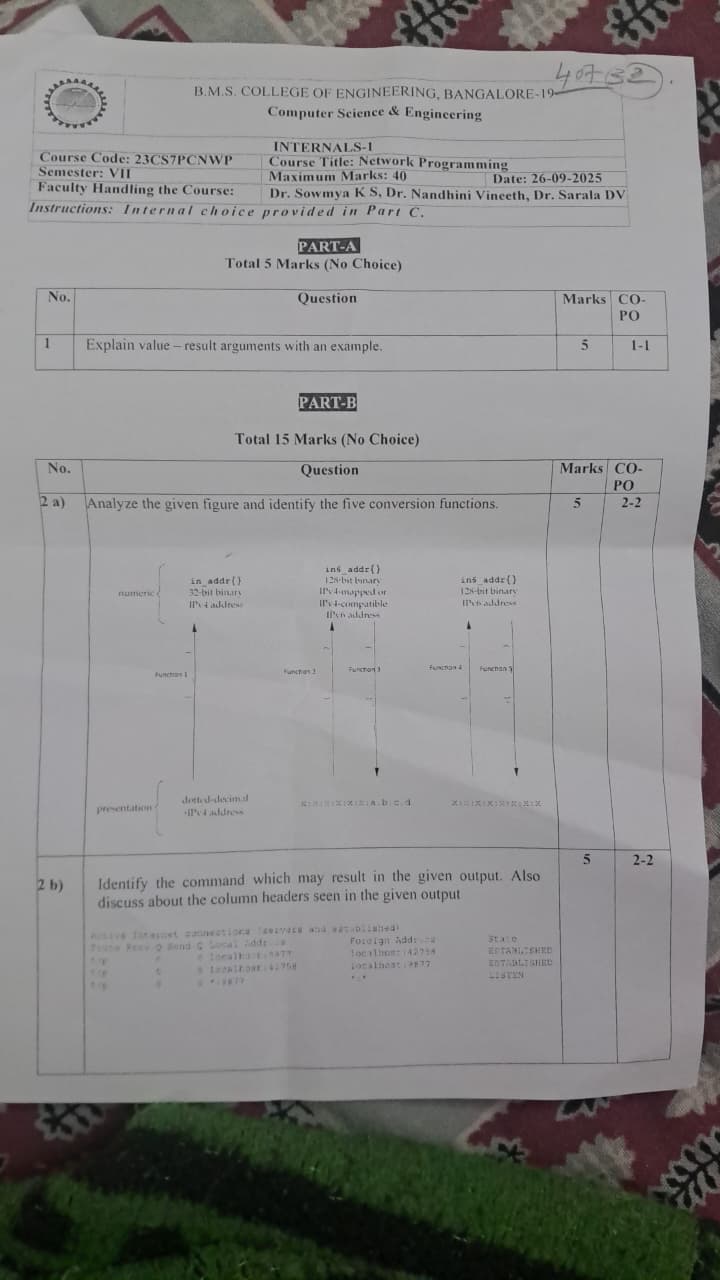
The scans the questions were transcribed from. The figure in Q2(a) and the output in Q2(b) are blurred on the original; both were reconstructed from the textbook and are given above in full.